
Requests and appointments
Vehicle pick-up time: calculated, hidden or your own text
For a service where the customer leaves the vehicle, you choose what they see about pick-up.
Before you start
- In the menu, open "Online booking", "Services and hours" tab.
Open a long service
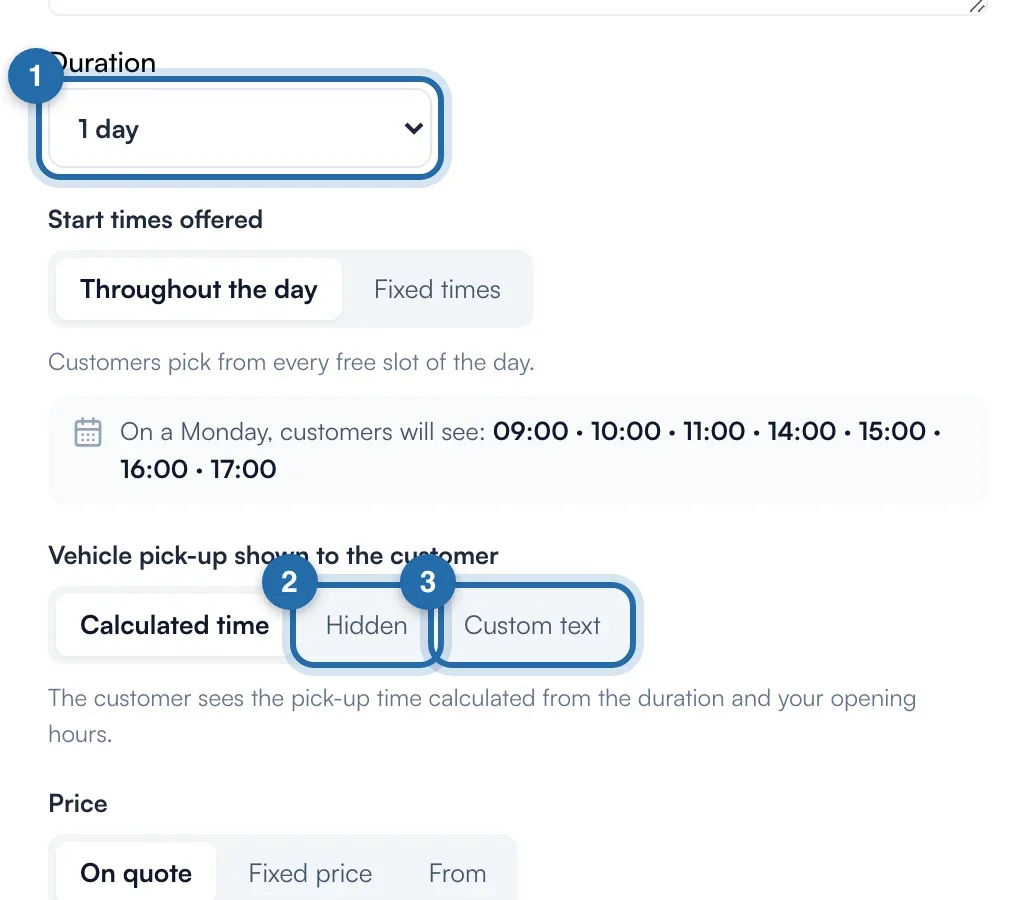
Click a service, or "Add". The setting only appears if the "Duration" is longer than your longest opening slot in a day (for example 1 day, or 5 h with 4 h slots): the customer then drops off the vehicle.
Choose what the customer sees
Under "Vehicle pick-up shown to the customer": "Calculated time" (based on the duration and your hours, skipping breaks and closures), "Hidden" (the customer only sees the drop-off time) or "Custom text".
Write your text
With "Custom text", type the text to show instead of the time, 255 characters at most. Without text, "Save" stays greyed out.
Save
Click "Save". In the list, the service has the "Pick-up hidden" or "Pick-up: text" badge. Nothing shows in "Calculated time" mode.
What you see in the request
The appointment details in "Requests" show "Pick-up:" with the calculated time, then "Shown to the customer:" and your text, or "Pick-up time not shown to the customer". Your calendar keeps the vehicle until the calculated time.
What your customer sees
The customer sees "drop-off" with the chosen date and time, then "Pick-up" and the calculated time, or your text, or nothing. The setting applies to the booking form, the E85 simulator and the remapping simulator.
If it doesn't work
- I don't see the setting in my service.
- The duration is not longer than your longest opening slot: the customer waits on site, there is no pick-up to announce.
- I moved the appointment. Does the pick-up time follow?
- Yes, it is recalculated on the new time.