
Simulators
Bundles: options included by default with a stage
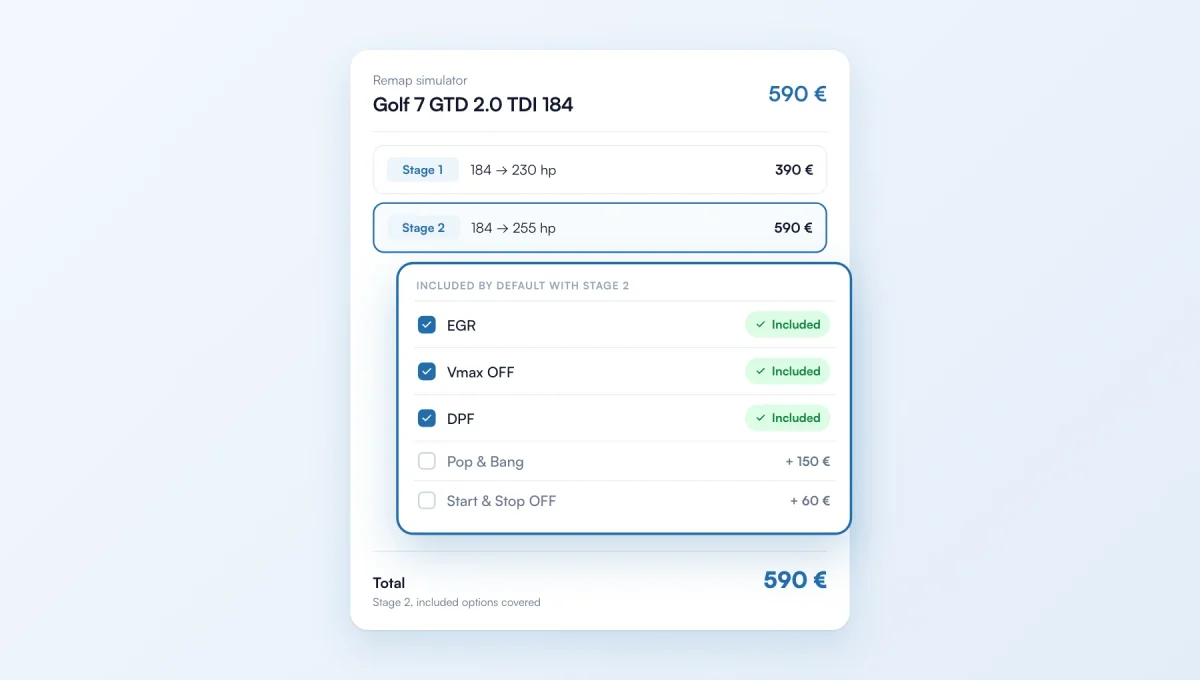
A bundle can now include its options by default. When the customer picks the stage in the simulator, the bundle's options are ticked automatically and marked "Included". They see right away what the price covers, and don't add those options a second time.
How it works
Where: Options and bundles › Your bundles. Create or edit a bundle, then tick "Include by default with …" at the last step.
Example: Stage 2 with EGR, Vmax OFF and DPF on all diesel vehicles, + €0. A customer who picks Stage 2 sees the three options ticked, "Included", and the Stage 2 price stays the same.
The other options are still ticked by the customer, at their price.
Same in the quote form on your ChiptuneMAP page, and in the request you receive.
The feature behind it
What it does, in detail, with screens from the app.