
ChiptuneMAP
Hide or delete my listing
Take your listing out of the directory for a while without losing anything, or delete it for good.
Before you start
- An existing ChiptuneMAP listing.
Hide the listing
In Settings > My ChiptuneMAP listing, below the figures, switch off "Visible on ChiptuneMAP". The message "Your listing is hidden from ChiptuneMAP" confirms it and the status changes to "Hidden: it does not appear in the directory.". Everything is kept.
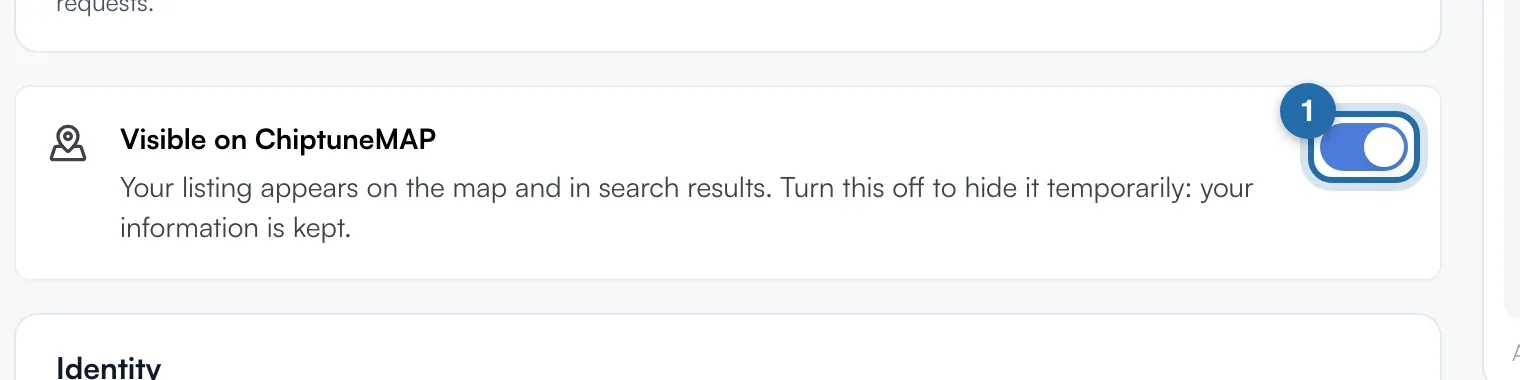
Put the listing back online
Switch the same toggle back on: "Your listing is visible on ChiptuneMAP". Nothing else to redo.
Delete the listing
At the very bottom of the page, in "Delete my listing", click "Delete".

Confirm
The "Delete your listing?" window reminds you that the listing and its logo disappear from ChiptuneMAP for good. Click "Delete my listing" to confirm, or "Cancel". Your ChiptunePRO account, your customers and your settings are kept.
What your customer sees
Hidden or deleted, your listing no longer appears on the ChiptuneMAP map or list. Your /rdv booking link keeps working, even when the listing is hidden.
If it doesn't work
- Hide or delete?
- Hiding keeps everything (description, photos, work, hours) and is undone in one click. Deleting is final for the listing.
- The "View my listing" button has disappeared.
- It only shows when the listing is published and visible.